It took me three months of using Claude Code before I finally installed a hook. It took me about ten minutes after that to wonder why I’d waited so long.
The problem was banal. I’d been running Claude Code alongside a Spring Boot project at work, and after a longer refactoring session — twenty-something files touched, an interface renamed, a couple of implementations moved to a new package — I committed and pushed. Everything compiled. Tests passed. Life was good until Jenkins came back thirty seconds later with a red X: spotless:check had failed on eight files. Claude had used its own idea of import ordering, and our project uses a stricter one.
I fixed it by hand, pushed again, and thought: this is exactly the problem hooks exist for.
Ten minutes later, I had a small entry in .claude/settings.json that ran mvn spotless:apply after every Java file Claude wrote. That specific spotless-related annoyance never came back. It wasn’t a dramatic fix. Claude didn’t get smarter. Nothing about the model changed. I just added a small, deterministic guardrail that fires after Claude does its thing, whether Claude remembers to be tidy or not.
That’s what this article is about. Where subagents (Part 8) are Claude reasoning its way through a specialised task, hooks are the opposite: shell scripts that fire at fixed points in Claude’s execution, entirely outside the LLM. They’re the deterministic layer. They fight noncompliance, not ignorance — meaning if Claude keeps doing the wrong thing because it doesn’t know the right thing, the fix is a skill or a CLAUDE.md; but if Claude knows the right thing and does it inconsistently, a hook is your tool.
By the end of this article you’ll have a mental model for when to reach for a hook, worked examples of three hooks I actually run (a git-commit attribution hook, a Spring-specific @Transactional guard, and a hook to prevent direct pushes to Gits main branch), a set of short-form recipes covering twelve other hooks worth installing, and a security section that appears earlier and matters more than in any other article in this series.
Hooks run shell commands automatically with your permissions. That’s the pitch, and it’s also the risk.
What a Hook Actually Is
A hook is a shell command that Claude Code runs — with no LLM in the loop, no prompting, no reasoning — when a specific event fires inside a Claude Code session. When Claude writes a file, that’s an event. When it’s about to run a bash command, that’s an event. When the session starts. When Claude finishes responding. Each of those (and about 25 others) can have hooks attached.
Every hook receives structured JSON about what just happened on stdin, and communicates back through an exit code, plus optionally stdout and stderr.
Contrast with the tools we’ve covered so far. Slash commands you invoke — they run because you typed them. MCP servers and LSP are tools Claude can call — they run because the model decided to reach for them. Skills are activated by Claude when it recognises the situation. Subagents are dispatched by the main agent to do specialised work. In all four, an LLM makes the decision. Hooks make no such decision. They fire because an event happened, always.
That’s the whole point. Hooks are what makes Claude’s non-deterministic reasoning safe to unleash on a real codebase. Every safety net you install — every “wait, that looks dangerous” moment — is a hook. Every automation like “format after edit” is a hook. If you want a rule that fires with 100% certainty, hooks are the layer that gives you that.
The Events That Matter
Claude Code’s reference lists around 30 hook events across the current release. Five cover almost everything you’ll actually build:
PreToolUse — fires before any tool call (Bash, Write, Edit, Read, WebFetch, MCP tools). This is the blocker. Exit code 2 stops the tool from running. This is where you install your guardrails.
PostToolUse — fires after a tool completes successfully. Cannot undo the tool call. This is where you install cleanup: format after write, log after bash, notify after commit.
UserPromptSubmit — fires when you submit a prompt, before Claude sees it. Here you inject context (current file, current ticket, current branch). Also the layer where you can block a prompt that shouldn’t run.
SessionStart — fires once at session start, and on resume, clear, and compact. Where you set up per-session state: warm caches, log the start, inject fresh project facts.
Stop — fires when Claude finishes a response. Where you run end-of-turn checks: tests, lint, notifications.
The other events cover more specific situations (SubagentStop, PreCompact, Notification, PermissionRequest, session-end, and various MCP-specific events). They exist for the day you need them; I’ve used maybe three of them in production across a year of building hooks.
One useful mental shape: PreToolUse hooks fight the problem before it happens. PostToolUse hooks fix the problem after it happens but before you notice. Stop hooks summarise the problem when Claude thinks it’s done. UserPromptSubmit and SessionStart are the context layer — they don’t fight problems, they prevent them by giving Claude better information upfront.
The full picture is worth a look. Anthropic’s documentation has a diagram of the complete lifecycle, showing every event and how the tool loop, the agentic loop, and the per-turn wrapper nest into each other:
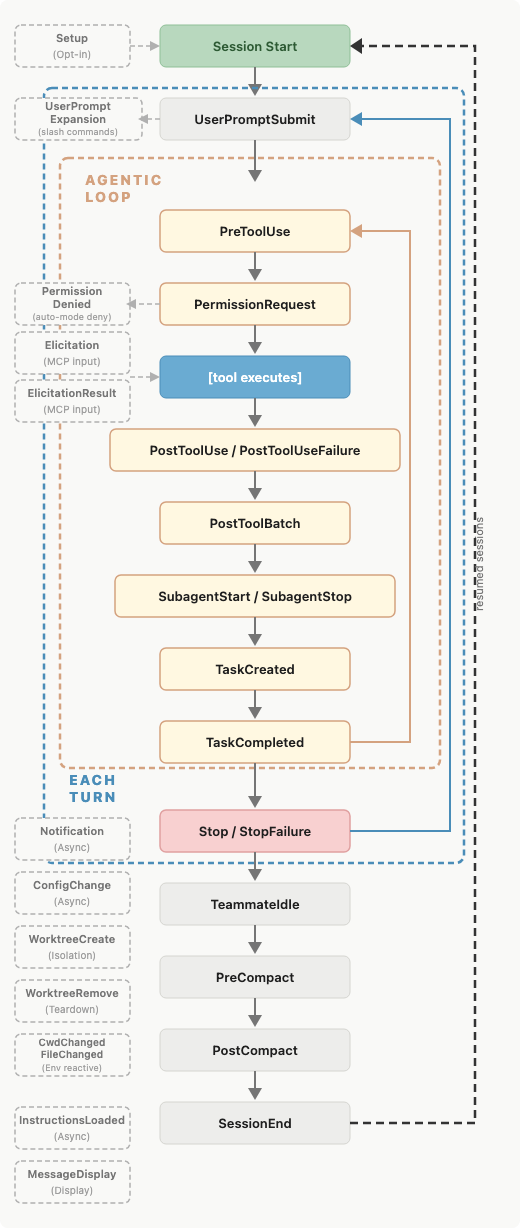
Diagram: Anthropic Claude Code documentation.
The five events named above sit inside the agentic loop and the per-turn band — they’re where nearly every practical hook you’ll ever write ends up. Everything else exists for when you specifically need it: PreCompact for state that has to survive context compression, SubagentStart/SubagentStop for parallel-work bookkeeping, Notification for the desktop-alert hook, and so on. Don’t try to memorise the whole thing. Refer back to it when you need to work out where in the flow your specific hook would fire.
The Configuration
Hooks live in settings.json. Two files matter:
.claude/settings.json— project-scoped, committed to git, applies to everyone who opens the project.~/.claude/settings.json— your personal global config, applies across every project on your machine.
There’s also .claude/settings.local.json, which is per-project but git-ignored — for personal hooks you want in a shared project without pushing them to everyone.
The shape:
| |
Nested three levels. Under each event name is an array of matchers. Under each matcher is an array of hook commands. Yes it looks over-engineered for simple cases — the shape earns its keep when you want three different hooks on the same event, each with a different matcher.
The matcher filters which specific tool triggers the hook. Bash matches only Bash tool calls. Write|Edit (a pipe-separated list) matches either. * or the empty string matches everything. Anything more complex is treated as a JavaScript regex.
Hooks support timeout (seconds), and as of early 2026, async: true to run in the background without blocking Claude’s execution. Async is useful when the hook does something slow (like running a full test suite) and you don’t want to make Claude wait; the trade-off is that the hook’s output won’t be visible in the current turn.
The $CLAUDE_PROJECT_DIR environment variable is set to the project root — safer than assuming a hardcoded path.
The Input, Output, and Exit Code Contract
Every hook receives a JSON payload on stdin describing the event. For a PreToolUse hook on Write, you’d get something like:
| |
Read it with jq, or any language your hook is written in. The fields vary by event, but session_id, cwd, and hook_event_name are always there.
Communication back to Claude Code happens three ways:
Exit codes. Exit 0 means “allow / continue.” Exit 2, on hooks that support blocking (PreToolUse, UserPromptSubmit, Stop), means “block, and show my stderr to Claude as the reason.” Exit 1 — which is the conventional Unix failure code — means “something went wrong, log it, but do not block.” This is the single most common hook footgun: script fails, script exits 1, script author thinks the tool was blocked. It wasn’t.
stdout. For most events, stdout is captured but doesn’t affect the flow. For UserPromptSubmit, stdout is prepended to the user’s prompt — that’s the mechanism for context injection. For SessionStart, stdout can add additional context to the initial prompt.
Structured JSON on stdout. For richer responses, hooks can print a JSON object with fields like continue, stopReason, hookSpecificOutput, and additionalContext. This is the escape hatch when exit codes aren’t expressive enough. We’ll use it in the first full example below.
For 90% of hooks you’ll write, exit 0 and exit 2 are the entire vocabulary you need.
Security First
Before I show you a single hook worth installing, a section that belongs earlier in this article than it would in any other in this series.
Hooks run shell commands automatically, with your user’s permissions, and Claude Code will not ask. When you install a hook, you’re saying: this command should run at this event, forever, without a permission prompt. That’s the entire point — deterministic guardrails need to be automatic to work. But it also means the trust model for hooks is stricter than for MCP servers (which Claude can only invoke through explicit tool calls), stricter than for slash commands (which you have to type), stricter than for anything else in the Claude Code ecosystem.
Three concrete implications.
Read every hook script before you install it. Yes, this sounds obvious. Yes, people skip it all the time when they copy a “cool hook” from a blog post. Don’t. A malicious hook installed in a project’s .claude/settings.json could run any shell command every time any developer on the team opens the project — curl your SSH keys to an attacker’s server, delete files, install backdoors. The blast radius is large. Treat a .claude/settings.json change in code review the way you’d treat a change to a GitHub Actions workflow: hostile until proven otherwise.
Sanitise the JSON you read on stdin. Fields like tool_input.command, tool_input.new_string, and user_prompt are untrusted input. Claude might have generated them, but a malicious prompt or a compromised MCP server could inject shell metacharacters. Use jq to parse rather than regex-scraping; quote every variable in shell scripts; and if the hook is in bash, use set -euo pipefail and prefer printf over echo where the value could contain backslashes.
Be paranoid about timing-sensitive hooks. A PreToolUse hook fires before the tool runs — between “Claude decided to run this” and “the tool actually ran.” A hook that’s slow or that can be tricked into hanging can block your entire session. Set explicit timeout values on any hook that does anything non-trivial. The default is generous.
The three rules I follow personally: hooks in project-scope settings.json only if I’ve read the script; hooks that write to arbitrary paths fire only in PostToolUse (never PreToolUse); hooks that make network calls fire only in Stop or SessionEnd, never on every tool call.
Everything below assumes you’ve internalised this. On to the recipes.
Full Example 1: Git Commit Attribution
This is the one nobody talks about but everybody who works in a regulated environment ends up wanting. A PreToolUse hook on Bash that detects git commit, and injects trailer lines identifying the Claude session into the commit message. Suddenly your git log becomes a searchable record of exactly which commits came out of Claude sessions.
The settings.json entry, in .claude/settings.json:
| |
The script at .claude/hooks/git-attribution.sh:
| |
Two subtleties worth noting.
The hook uses structured JSON output rather than exit-code signalling. The hookSpecificOutput.updatedInput field is how you rewrite tool arguments before the tool runs. Exit code 2 would have blocked the commit entirely; here we want the commit to happen, just with a different message. This is the escape hatch mentioned in the previous section, in real use.
The hook only fires on -m-flag commits. For commits that open the editor for a longer message, this approach doesn’t work — you’d need a Git-side hook (prepare-commit-msg) instead. For most day-to-day Claude Code commits, -m covers the vast majority of cases.
After installing, your git log starts looking like this:
| |
Which then makes git log --grep="Claude-Session-Id" a working query for “every AI-assisted commit.” Using AI at scale, that traceability isn’t a nice-to-have — it’s an audit requirement.
Full Example 2: The @Transactional Boundary Guard
The second full example is Java-specific and prevents a class of bug I’ve watched people ship more than once: @Transactional applied to a private method, or to a method on a class without a Spring stereotype, where Spring’s proxy-based AOP silently makes the annotation a no-op.
The hook: PreToolUse on Write and Edit, matching only .java files. If the diff introduces @Transactional on a private method, or on a class without an @Service/@Component/@Repository/@Controller annotation, block the write with a message explaining why.
| |
The script:
| |
This is regex-based, not AST-parsed, which means it will occasionally have false positives (a comment mentioning @Transactional on a private method, for instance, or a Javadoc example). For a production version I’d reach for a proper Java parser — javaparser via a small helper JAR, or spoon if you’re already using it in the project. For teaching, the regex version shows the shape.
The value proposition of this specific hook is worth naming explicitly. The proxy-AOP quirk is documented — every senior Java developer knows it — and Claude also knows about it in principle. But when Claude is generating a lot of code fast, this specific footgun slips through. The hook codifies institutional knowledge into a check that fires every time, regardless of who is driving the session. That’s the pattern hooks are perfect for.
Full Example 3: Protect the Main Branch
The third full example is universal — every team has a “don’t commit directly to main” rule — and it turns out to be a hook Claude Code specifically benefits from. Claude in the middle of an agentic loop, working through a multi-step task, will occasionally commit before you’d have told it to; and in a fresh clone, or after a git checkout main for reference reading, that first commit can silently land on the wrong branch. A server-side branch protection rule catches this eventually. A local pre-commit hook catches it before the push. This hook catches it before the commit even runs.
The setup: a PreToolUse hook on Bash that intercepts git commit calls, checks the current branch against a configurable list of protected branches, and blocks the commit if there’s a match.
| |
The script at .claude/hooks/protect-main-branch.sh:
| |
Three design choices worth naming.
The regex is intentionally loose. ^git[[:space:]]+commit\b matches git commit, git commit -a, git commit -m "...", git commit --amend, and anything else that starts with the two words. If you find yourself with false negatives — Claude aliasing git in some session-scoped way, for instance — tighten the pattern; for most day-to-day work the loose version does the job.
The escape hatch is a magic marker, not a config flag. Same pattern as the destructive-git recipe further down. To commit to main deliberately, Claude (or you, if you’re driving) has to include ALLOW-MAIN-COMMIT somewhere in the command. Explicit, greppable in your shell history, impossible to forget you did it. Config flags for overrides get left on and forgotten; magic markers stay noisy on purpose.
Detached HEAD is handled explicitly. Without the check, git rev-parse --abbrev-ref HEAD returns the literal string "HEAD" in that state, which doesn’t match any protected branch and would allow the commit through — but with the check it’s clear the hook considered and dismissed the case. Small, defensive, worth having.
The one thing this hook doesn’t replace is a server-side branch protection rule on the git host. Server-side rules catch pushes from any client — a colleague’s checkout, a CI job, a script — while a hook only catches Claude Code sessions on your machine. Belt and braces. If you have both, Claude gets a fast, local, informative failure; if you have only the server-side rule, Claude commits, tries to push, and fails opaquely thirty seconds later. Neither is broken, but the hook plus the rule is best.
Twelve More Recipes
Everything below is short-form: the shape of the settings.json entry and enough description that you can write the script yourself. All follow the same pattern as the two full examples above — parse the JSON, check a condition, exit 0 or 2 (or emit structured output). Apply the ones you deem useful.
Auto-format after edit. PostToolUse on Write|Edit. Runs the project’s formatter after Claude touches a file. For Java, mvn spotless:apply -DspotlessFiles=<path>; for a mixed repo, a format.sh that dispatches by extension. The single most useful hook to install first.
| |
Desktop notification when Claude needs input. Notification event. Pipes the incoming JSON through terminal-notifier on macOS, notify-send on Linux, or a Slack webhook. Universal once you’ve walked away from a session and come back an hour later to find it stuck on a yes/no question.
Block dangerous bash commands. PreToolUse on Bash. The script parses tool_input.command and exits 2 if it matches a denylist: rm -rf /, chmod -R 777, anything piped from curl to sh, anything shelling out to a package manager with --force. Simple, effective safety net.
Secret scanning before write. PreToolUse on Write|Edit. Script reads the new content and runs it through gitleaks --stdin or a compact regex list (AWS access keys, GitHub tokens, private-key headers, JDBC URLs with inline passwords). Exit 2 with the finding on stderr. Catches the class of accident where Claude generates example config with something that looks like a placeholder but isn’t.
Confirm before destructive git operations. PreToolUse on Bash. Blocks git reset --hard, git rebase -i, git push --force, git push --force-with-lease unless the message contains a magic marker like # CONFIRMED on the previous line. Prevents accidents on shared branches without preventing intentional force-pushes.
Rate-limit token spend. PreToolUse on *. Script maintains a per-day token counter in ~/.claude/spend.txt, refuses new tool calls once you exceed a threshold. Won’t stop a runaway model mid-turn but will stop the next turn from starting. Especially useful when you’re paying per-token via API.
Session-start context injection. SessionStart. Script emits additionalContext containing your current git branch, uncommitted changes, active JIRA ticket, and a link to the project’s CLAUDE.md. Saves you re-explaining state at every session boot.
| |
Per-tool-call audit log. PostToolUse on *. Appends a structured JSON line to .claude/audit.log: timestamp, session id, tool name, and a summary of the input. For teams that need to demonstrate to auditors what Claude actually did during a session.
Flyway migration numbering guard. PreToolUse on Write matching paths under src/main/resources/db/migration/. Reads existing migration filenames, extracts the highest version, exits 2 if the new file doesn’t strictly increase the version. Prevents the merge-conflict-time discovery where two developers both wrote V42__do_thing.sql.
Lombok-vs-record nudge. PreToolUse on Write to new .java files. If the class is annotated with @Value, @Data, or @Builder and contains no methods beyond generated accessors, echo a suggestion to stderr recommending a Java record. Exits 0 (doesn’t block) — this is a soft nudge, not a rule. Effectively codifies your team’s answer to “when do we use records versus Lombok?” without relitigating it in every PR review.
Commit-message convention enforcement. PreToolUse on Bash for git commit -m calls. Parses the -m argument; exits 2 if it doesn’t start with a Conventional Commits type (feat:, fix:, chore:) or a JIRA ticket ID. Optional refinement: use hookSpecificOutput.updatedInput to rewrite the message rather than block, prepending the JIRA ID from the current branch name.
Auto-open new files in IDE. PostToolUse on Write. When Claude creates a new file, run idea "$file_path" (IntelliJ) or code "$file_path" (VS Code) to open it. Small quality-of-life win — you always see new code immediately, without hunting through the file tree.
Between the three full examples above and these twelve, you have a starter set that covers most Java teams’ hook needs for a year.
When Hooks Are the Wrong Tool
Same mission as the equivalent section in Part 8: hooks are useful, and overuse makes Claude Code miserable.
When you’d rather teach than enforce. If Claude keeps writing @Transactional on private methods because it doesn’t know about the proxy-AOP rule, a hook fixes the symptom. A well-written CLAUDE.md fixes the cause. Prefer teaching where teaching works.
When the rule needs to apply to humans too. If a hook enforces “no hardcoded database passwords in application.yml,” the same check should exist in your CI pipeline, so a human PR is caught by the same rule. A Claude-only hook means the rule is enforced against Claude and no one else — which is worse than not having the rule.
When the hook is slow. A PreToolUse hook that takes 3 seconds means every matching tool call takes at least 3 seconds. Push slow checks to PostToolUse where the tool has already run, or make them async so they don’t block. A hook that makes Claude Code feel sluggish will get uninstalled within a week.
When there’s a better home in your toolchain. git commit -m will run any pre-commit hooks you’ve installed. Those apply to humans, to Claude Code, and to CI — three targets, one script. If your rule is really about git, put it in .git/hooks/pre-commit (or use a manager like pre-commit, husky, or lefthook), not in a Claude hook.
Hooks are for rules that specifically need to apply to Claude Code, that are fast, and that don’t have a better home elsewhere in your toolchain.
That’s hooks. Part 10 — the final article in this series — is the capstone: putting CLAUDE.md, skills, custom commands, MCP, LSP, agents, subagents, and hooks together into a single production-grade Claude Code setup for a Spring Boot microservices project. Not a toy demo, not a “look, I can install six things at once” showcase. The setup I actually run at work, opinionated choices and all, with the reasoning behind each one.