Imagine a smart intern who knows everything by heart (the LLM) versus the same intern who, for every tricky question, first checks the internal wiki and docs (RAG). Without RAG, the intern confidently says something that sounds right but might be off; with RAG, they flip to the correct policy first and then quote exactly what it says.
BrightCart’s assistant has come a long way. It holds a conversation, it looks up real orders, it guards against hostile input. But there’s a question it still faceplants on, and it’s one customers ask constantly:
Agent: What’s BrightCart’s return policy for a damaged item? Assistant: Typically, most retailers allow returns of damaged items within 30 days with a receipt…
“Typically.” “Most retailers.” That’s the sound of a model guessing. It has no idea what BrightCart’s actual policy is, so it’s reaching for the average of every return policy it saw during training and hoping that’s close enough. Sometimes it’s close. Sometimes it invents a 30-day window when BrightCart’s is 14, and now your assistant has promised a customer something the company won’t honour.
The problem is simple: the model has never seen BrightCart’s documents. The return policy, the shipping terms, the product manuals, all of that lives in files and wikis that were nowhere near the model’s training data. You can’t fix this by prompting harder. The knowledge genuinely isn’t in there.
What you can do is hand the model the right document at the moment it needs it. That’s Retrieval-Augmented Generation, and it’s what this article builds, end to end.
Source, as always, in the GitHub repository.
What RAG Actually Is
Strip away the acronym and RAG is embarrassingly simple. Before you ask the model a question, you go find the documents most likely to contain the answer, and you paste them into the prompt alongside the question. The model then answers using that supplied context instead of its training-time memory.
It’s an open-book exam. Instead of forcing the model to recall BrightCart’s return policy from memory it never had, you slide the policy document across the desk and say “the answer’s in here.”
Three steps, and the acronym almost spells them out:
Retrieve the documents relevant to the question. Augment the prompt by stuffing those documents in as context. Generate the answer from that augmented prompt.
The retrieve step is the interesting one, because “find relevant documents” is deceptively hard. You can’t just keyword-match. A customer asking “how do I send back a broken blender” needs to find a policy document that says “damaged goods returns,” and those two phrases share almost no words. You need to match on meaning, not spelling. That’s where embeddings come in, and they’re worth understanding properly before we write any code.
Embeddings, Vectors, and Similarity
Concept Primer: How Text Becomes Searchable by Meaning An embedding is a list of numbers, a vector, that represents the meaning of a piece of text. You feed text into an embedding model and it returns something like a few hundred floating-point numbers. The magic is that texts with similar meaning produce vectors that sit close together, and texts about different things sit far apart. “Return a damaged item” and “send back a broken product” land almost on top of each other, even though they share barely a word. “Where is my package” lands somewhere else entirely.
You can’t picture a few-hundred-dimension space, and neither can I. But the two-dimensional cartoon version gets the idea across: every piece of text is a point, related meanings cluster, unrelated ones drift apart. To find documents relevant to a question, you embed the question too, then look for the document points nearest to it. “Nearest” is literally measured as distance in that space.
Here’s that cartoon:
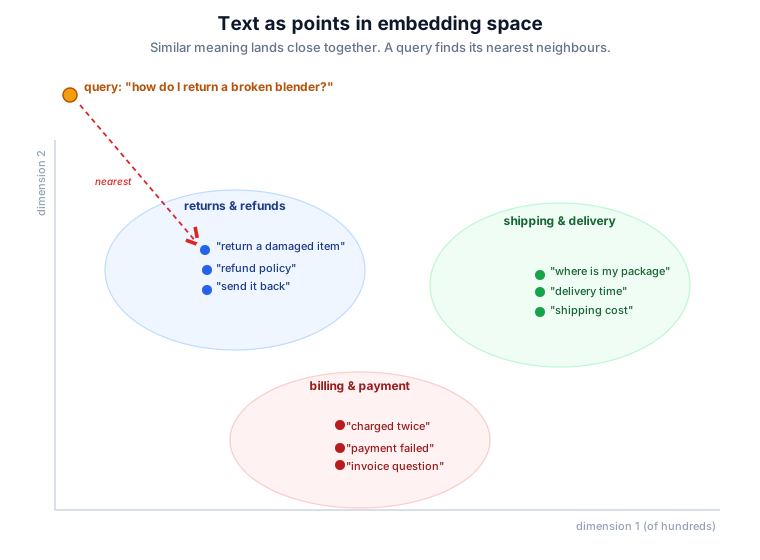
The customer’s question becomes a point. The system finds the document chunks sitting closest to it, and those are, by construction, the ones most likely to be about the same thing. No keyword overlap required. That’s the whole trick behind semantic search, and it’s what makes the “retrieve” in RAG work.
One thing worth saying plainly, because it trips people up: you never compute these vectors by hand, and you barely think about them. The embedding model does it. Spring AI calls that model for you. What you actually work with is documents in, relevant documents out. The vectors are plumbing. Useful to understand, invisible in daily use.
The Ingestion Pipeline
Before you can retrieve anything, the documents have to be read, chunked, embedded, and stored. Spring AI calls this the ETL pipeline, borrowing the old data-engineering term: Extract, Transform, Load. Three roles, three interfaces.
A DocumentReader extracts. It pulls raw content from a source and hands back a list of Document objects. There’s a reader for nearly everything: TikaDocumentReader handles Word, PDF, HTML and more through Apache Tika, PagePdfDocumentReader is PDF-specific, and there are plain text and markdown readers too. We’ll use markdown, because BrightCart’s policies are markdown files and I’d rather you see clean readable input than wrestle with PDF extraction quirks in a tutorial. Swapping in Tika for real PDFs is a one-line change.
A DocumentTransformer transforms. The one that matters here is TokenTextSplitter, which chops long documents into smaller chunks.
A DocumentWriter loads. A VectorStore is a DocumentWriter, so writing to it triggers the embedding of each chunk and stores the vectors. We’ll use SimpleVectorStore, an in-memory store, and leave the real databases for the next article.
Why Chunk At All?
Chunking feels like a fiddly detail, but it’s doing real work, so it’s worth a paragraph.
If you embed an entire 20-page manual as one vector, that vector is a blurry average of everything in the document. It represents “this manual is vaguely about coffee machines” and nothing sharp enough to match a specific question. Worse, when you retrieve it, you’ve got 20 pages to stuff into the prompt, most of it irrelevant, all of it costing tokens.
Chunk the manual into paragraph-sized pieces and each chunk gets its own focused vector. The paragraph about descaling embeds as “descaling,” the warranty paragraph embeds as “warranty,” and a question about descaling retrieves precisely the paragraph it needs. Smaller, sharper, cheaper. TokenTextSplitter handles the splitting, aiming for chunks of a configurable token size and trying not to hack sentences in half.
Wiring the Pipeline
The whole ingestion pipeline is, honestly, one line of real work. Here it is inside a service that loads BrightCart’s knowledge base at startup:
| |
The line that does everything is vectorStore.write(splitter.split(reader.read())). Read the document into Document objects, split them into chunks, write the chunks to the vector store. The write call is where the embedding model gets invoked, once per chunk, automatically. You never call it yourself.
To swap markdown for real PDFs, you’d replace new TextReader(document) with new TikaDocumentReader(document) and add the Tika dependency. Everything else stays put. That’s the payoff of the reader abstraction.
BrightCart’s Knowledge Base
The documents themselves are just markdown files under src/main/resources/knowledge/. Here’s the return policy, deliberately giving BrightCart a 14-day window so we can later catch the model’s “typically 30 days” guess in a lie:
knowledge/return-policy.md:
| |
The other two files follow the same shape: shipping-terms.md with delivery windows and costs, and espresso-machine-manual.md with a few paragraphs including one on descaling. (All three are in the repo; I’m not going to pad the article with markdown you can read there.)
Now wire the vector store as a bean and kick off ingestion at startup. SimpleVectorStore can persist its embeddings to a JSON file, which means you embed once and reuse across restarts instead of paying for embedding on every boot:
| |
Now, one thing that trips people up here, and it tripped me up too. That RagConfig needs an EmbeddingModel bean, and if you’re using Anthropic as your chat provider, you don’t have one. Anthropic doesn’t offer an embeddings API at all, so the Anthropic starter provides a chat model and nothing else. Run the app as-is and Spring fails fast:
| |
Embedding is a separate capability from chat, and it needs its own provider. The simplest fix is to add OpenAI purely for embeddings, alongside Anthropic for chat. Add the OpenAI starter:
| |
Then tell Spring AI to use OpenAI for embeddings, and give it your key:
| |
That spring.ai.model.embedding=openai line is the important one. With both an Anthropic and an OpenAI starter on the classpath, it tells Spring AI which provider owns embeddings, so you get an OpenAiEmbeddingModel bean and Anthropic stays your chat model. Chat from one provider, embeddings from another, wired by configuration.
If you’d rather not add a second paid provider, Ollama does embeddings locally and free, mirroring the option from article 2. Add the Ollama starter, pull an embedding model with ollama pull nomic-embed-text, and configure:
| |
One trap to avoid while you’re here: don’t try to fix this by hand-rolling your own @Bean EmbeddingModel. Spring AI’s auto-configuration won’t back off for a bean declared against the EmbeddingModel interface, so you end up with two beans and a NoUniqueBeanDefinitionException. Select the provider with the spring.ai.model.embedding property instead, and let auto-configuration do the rest.
Start the app and the logs show the pipeline running:
| |
BrightCart’s knowledge now lives in the vector store as embedded, searchable chunks. Time to actually use it.
Retrieval and Generation With QuestionAnswerAdvisor
Here’s where the series pays you back for sticking with it. RAG in Spring AI is an advisor. The same mechanism that powered tool calling in article 6 and memory in article 8 powers retrieval too. If you understood the advisor chain, you already understand where RAG plugs in.
The advisor is QuestionAnswerAdvisor. On each call it embeds the user’s question, runs a similarity search against the vector store, takes the top matching chunks, and stuffs them into the prompt as context before the model ever sees it. Retrieve, augment, generate, all inside one advisor sitting in the chain.
It needs its own dependency:
| |
Then wiring it onto a ChatClient is the pattern you’ve seen four times now:
| |
Two knobs on that SearchRequest are worth knowing. topK(4) says “retrieve the 4 most similar chunks”, enough context without drowning the prompt. similarityThreshold(0.5) says “ignore anything less than 50% similar”, which keeps genuinely irrelevant chunks out when a question has no good match. Tune both to taste; these are sensible starting points, not gospel.
A thin service and controller to drive it:
| |
| |
Now ask the question that faceplanted at the top of the article:
| |
| |
Fourteen days, photo evidence, free return shipping. Every detail lifted straight from the policy document, not averaged from the model’s training data. No “typically,” no “most retailers.” That’s the difference between a model guessing and a model reading.
Making It Admit What It Doesn’t Know
There’s a failure mode lurking here, and if you ship RAG without addressing it you’ll regret it. Ask the assistant something the documents don’t cover, and by default it may cheerfully fall back to guessing anyway, which is the exact behaviour we came here to kill.
Try it:
| |
BrightCart’s documents say nothing about student discounts. A well-behaved RAG system should admit that. A naive one might invent a plausible-sounding 10% off.
The fix is a custom prompt template on the advisor that gives the model a strict instruction: answer only from the provided context, and if the context doesn’t contain the answer, say so. The template has a {query} placeholder for the question and a {question_answer_context} placeholder that Spring AI fills with the retrieved chunks:
| |
Ask about the student discount again, and now:
| |
That’s the answer you want. A support assistant that says “I don’t know” is infinitely more useful than one that confidently makes things up, because the second kind you can never trust, and an assistant you can’t trust is just a liability with good grammar. This single prompt template is the line between a RAG demo and a RAG system.
What’s Naive About This
I’ve shown you RAG that works, but I’ve kept it simple on purpose, and honesty demands I point at the corners we cut.
The chunking is fixed-size and dumb. It splits on token count without understanding document structure, so it can still occasionally slice a policy clause in half. The retrieval is a single similarity search with no query rewriting, so a badly-phrased question retrieves badly. And the whole thing runs on an in-memory store that re-embeds from scratch unless you persist the JSON.
Spring AI has answers for the first two. RetrievalAugmentationAdvisor, from the spring-ai-rag module, is a more modular RAG advisor that supports query transformation, query expansion, and pluggable retrieval steps for when naive retrieval isn’t cutting it. It’s more machinery than BrightCart needs today, so I’m flagging it rather than building it. When your retrieval quality plateaus, that’s where you look.
The third corner, the in-memory store, is the one we fix next, and it’s a big one.
What’s Next
BrightCart’s assistant can finally read the company’s own documents. Ask it a policy question and it answers from the actual policy, and ask it something the docs don’t cover and it admits the gap instead of bluffing. Retrieval-Augmented Generation, running end to end, powered by an advisor sitting in the same chain you’ve known since article 6.
But SimpleVectorStore is a toy, and I mean that with affection. It holds everything in memory, it doesn’t scale past a modest document set, and it has none of the indexing, filtering, or operational muscle a real system needs. Fine for learning. Nowhere near production.
In article 10 we make the storage real: pgvector, Qdrant, Redis, and the rest. We’ll look at what actually distinguishes the vector store options, how to configure them in Spring AI, and how to write ingestion and retrieval code that doesn’t care which one you picked. The pipeline stays the same. The storage grows up.